
Compatibility with macOS Tahoe 26.1
We are pleased to announce that, as of March 18, 2026, a wide range of Antelope Audio hardware devices and software components are fully compatible with Apple’s latest operating system – macOS Tahoe 26.1.
All compatibility tests were conducted on Apple Silicon computers using the following versions:
Antelope Launcher: 3.3.25
Manager Server: 1.8.20
Unified Audio Driver: 4.6
Important Note When Updating from macOS Sequoia
When upgrading your system from macOS Sequoia to macOS Tahoe, you may be required to allow the Unified Driver kernel extension again.
This must be done in:
Security & Privacy settings
Recovery Mode (required for Apple Silicon computers)
Helpful guides:
To enable the driver in Recovery Mode:
https://support.antelopeaudio.com/en/support/solutions/articles/42000094423-antelope-audio-compatibility-with-apple-m1-computersTo allow the driver in Security & Privacy:
https://support.antelopeaudio.com/en/support/solutions/articles/42000098875-how-to-enable-the-unified-driver-on-mac-os-ventura
Hardware Compatibility
The following Antelope Audio devices are confirmed to operate normally on macOS Tahoe 26.1.
Supported Devices
Atlas i8
A4-1B
Discrete 8 Oryx Synergy Core
Discrete 8 Pro Synergy Core
Discrete 4 Pro Synergy Core
Orion Studio Synergy Core
Orion 32+ Gen 3
Orion 32+ Gen 4
Zenith 2
Zen Quadro Synergy Core
Zen Go Synergy Core (USB / Thunderbolt)
Zen Q Synergy Core (USB / Thunderbolt)
Zen Tour Synergy Core
Galaxy 32 Synergy Core
Galaxy 64 Synergy Core
MRC
SRC
Amari (Driver 4.2 required)
Axino
OCX HD
10MX
Zeo
Software Compatibility
| Software | Version | Status |
|---|---|---|
| Antelope Launcher | 3.3.25 | Compatible |
| Unified Audio Driver | 4.5.0 / 4.6 | Compatible |
| Native Plug-in Effects | Latest | Compatible |
| Antelope Manager Server | 1.8.20 | Compatible |
| Edge Duo Native Plug-in | 2.4.0 | Compatible |
| Verge Native Plug-in | 1.3.1 | Incompatible |
| Edge Quadro Plug-in | 1.5.0 | Compatible |
| Edge Solo Plug-in | 1.4.5 | Compatible |
| Edge Note Plug-in | 1.4.1 | Compatible |
| afx2daw | 1.2.1 | Compatible |
Legacy Device Compatibility
Owners of the following legacy audio interfaces can also run their devices on macOS Tahoe, provided they install the latest available device software.
Supported Legacy Interfaces
Discrete 8 Synergy Core
Discrete 4 Synergy Core
Discrete 8
Discrete 4
Orion Studio Rev.2017
Orion Studio
Goliath HD Gen 3 (Driver 4.2 required)
Goliath
Orion 32+
Orion 32 HD Gen 3 (Driver 4.2 required)
Zen Studio+
Zen Tour
Pure 2 (Driver 4.2 required)
Apple Silicon – First Device Connection
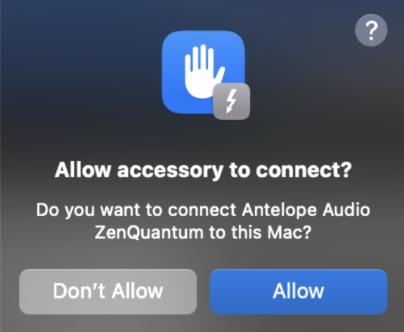
When connecting an Antelope device to an Apple Silicon Mac for the first time, the system will display a driver permission message.
Please click Allow when prompted in order to complete the installation.
Important Note for Certain Devices
Owners of the following devices using macOS 10.15 or later should review the dedicated support article:
Pure 2
Satori
MP8D
Live Clock
MP32
Please keep in mind that due to incompatibility of the above devices with the latest macOS versions, some users may still experience issues when running the software on their systems.
afx2daw Compatibility on macOS Tahoe
To install and use afx2daw on macOS Tahoe, please ensure that you are using:
Antelope Launcher version 3.3.25
The plug-in has been confirmed to operate normally with the following Digital Audio Workstations (DAWs):
Avid Pro Tools
Ableton Live
Image-Line FL Studio
PreSonus Studio One
Steinberg Cubase
Bitwig Studio
Cockos Reaper
Apple Silicon Notice
On Apple Silicon computers, some DAWs may need to run using Rosetta in order for afx2daw to function correctly.
For more details about Rosetta, please refer to Apple’s official article.
Logic Pro Users – afx2daw Validation
We have detected inconsistent validation behavior when afx2daw is validated by Logic Pro’s auvaltool.
On Apple Silicon computers, the validation may fail with the message:
“Crashed validation.”
If this occurs:
Disconnect your Antelope interface from the computer.
Open the Logic Pro Plug-in Manager.
Select Reset & Rescan for the plug-in.
If you encounter additional validation issues or difficulties with the afx2daw plug-in, please refer to this dedicated troubleshooting article.
Related Articles
For more information and the most up-to-date details, please refer to the Antelope Audio master compatibility chart.